
SNOWFLAKE AISQL
Last updated: November 2024
Quick answer: Snowflake Cortex AISQL embeds generative AI directly into Snowflake's SQL engine, letting you classify, filter, summarize, and compare text and images using standard SQL syntax. Key functions include AI_CLASSIFY, AI_COMPLETE, AI_FILTER, and AI_SIMILARITY -- all powered by large language models and requiring no external ML tooling or data pipelines.
Introduction
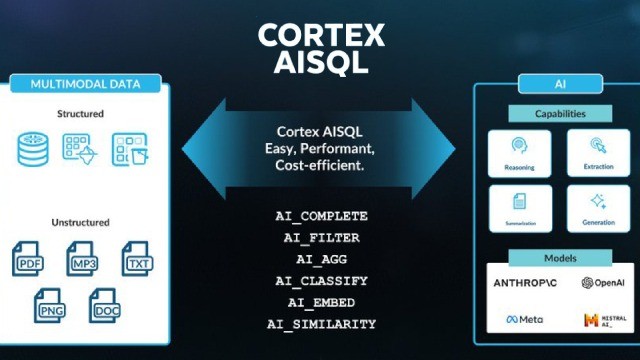
Snowflake Cortex AISQL integrates AI capabilities directly into Snowflake's SQL engine, transforming traditional SQL into an AI-powered query language. Cortex AISQL enables analysts to process multimodal data -- including text and images -- using familiar SQL commands without building separate ML pipelines. This guide covers the key Cortex AISQL features like AI_CLASSIFY, AI_COMPLETE, AI_FILTER, and AI_SIMILARITY, with practical examples for data professionals.
What is Snowflake Cortex AISQL?
Snowflake Cortex AISQL is an innovative extension of Snowflake’s SQL engine that embeds generative AI capabilities. It builds on the foundation of Snowflake Cortex AI and ML features to allow users to analyze both structured and unstructured data -- such as text and images -- using standard SQL syntax. By leveraging large language models (LLMs), it eliminates the need for complex data pipelines or specialized AI tools, making advanced analytics accessible to business analysts and data engineers alike.
Key Features of Cortex AISQL
AI_CLASSIFY : Classifies text or image into user-defined categories, such as sentiment analysis(positive, neutral, negative) or image labeling.
AI_COMPLETE : Generates text completions or descriptions for text and image inputs, enhancing data enrichment tasks.
AI_FILTER :Filters data based on natural language questions, applicable in SELECT, WHERE, and JOIN clauses. For example, it can identify images containing specific object or text matching certain criteria.
AI_SIMILARITY : Computes a similarity score based on the vector cosine similarity value of the inputes embedding vectors. Currently supports both text and image similarity computation.
AI_AGG : Reduces a column of text data using a natural language task description.
AI_SUMMARIZE_AGG : Summarizes a column of text data. Unlike AI_COMPLETE and SUMMARIZE(SNOWFLAKE.CORTEX), this function supports datasets larger than the maximum language model context window.
Getting Started with Cortex AISQL
Snowflake AISQL divides into three types of functions, Scalar Functions, Aggregate Functions and Helper Functions. In this blog, we are going to cover Scalar Functions and Aggregate Functions only.
Scalar Functions :
AI_CLASSIFY:

Arguments:
<input>: The string, image or prompt object that you’re classifying.For text classification, the input string is cae sensitive.Results may vary based on catilization.
<list_of_categories>: An array of categories with at least one and at most 500 dunique values. Categories are case sensitive. For each category, label is required(The name of the category) and description is Optional(Describe the label less than 25 words).
<config_object>: (optional) Configuration settings specified as lkey/values pairs.supported keys:
task_description : A explanation of the classification, which can help model understand the contex of the classification task and improve accuracy.
Output_mode : Set to ‘multi’ for multi-label classification.


AI_COMPLETE:
The syntax for the function depends on the type of the input that you provide. Divides into three based on arguments Single string arguments, Single image arguments, and Prompt object arguments.
Single argument: The function contains two required arguments and four optional arguments. The function can be used with either positonal or named argument syntax.

Arguments:
<MODEL>: A string specifing the model to be used. Specify one of the following models from Snowflake Documentation.
<PROMPT>:A string promp.
<MODEL_PARAMETERS>:An object containing zero or more of the following options that affect the model’s hyperparameters.
Temperature:A value from 0 to 1 that controls the randomness of the output of the language model. A higher value results in more diverse and random output, while low values makes the output more deterministic and focused.
Top_p:A value from 0 to 1 that controls the randomness and diversity of the language model, generally used as an alternative to temprature.The difference is that top_p restricts the set of possible tokens that the model outputs, while tempature influences which tokens are chosen at each step.
Max_token: Sets the maximum number of output tokens in the response. Small values can result in truncated responses.


Single image: The function contains two required arguments and four optional arguments. The function can be used with either positional or named argument syntax.

Arguments:
<model>: Models specified on snowflake documentation.
<predicate>: A string prompt.
<file>:A FILE type object representing an image.
<model_parameters>:An object containing zero or more of the following options that affect the model’s hyperparameters.
Temperature: A value from 0 to 1 that controls the randomness of the output of the language model. A higher value results in more diverse and random output, while low values makes the output more deterministic and focused.
Top_p: A value from 0 to 1 that controls the randomness and diversity of the language model, generally used as an alternative to temprature.The difference is that top_p restricts the set of possible tokens that the model outputs, while tempature influences which tokens are chosen at each step.
Max_token: Sets the maximum number of output tokens in the response. Small values can result in truncated responses.


example from snowflake documentation

Prompt object: The function can be used with either positional or named argument syntax.

Arguments:
<MODEL>: A string specifying the model to be used.see on snowflake documentation .
<model_parameters>: An object containing zero or more of the following options that affect the model’s hyperparameters.
Temperature: A value from 0 to 1 that controls the randomness of the output of the language model. A higher value results in more diverse and random output, while low values makes the output more deterministic and focused.
Top_p: A value from 0 to 1 that controls the randomness and diversity of the language model, generally used as an alternative to temprature.The difference is that top_p restricts the set of possible tokens that the model outputs, while tempature influences which tokens are chosen at each step.
Max_token: Sets the maximum number of output tokens in the response. Small values can result in truncated responses.


AI_FILTER:
Classifies free-form prompt inputs into a boolean.
AI_FILTER TO SINGLE TEXT:

AI_FILTER TO SINGLE IMAGE:

AI_FILTER TO MULTIPLE COLUMNS WITH BOTH TEXT AND IMAGE:

Arguments:
<INPUT>: A string containing the text to be classified.
<PREDICATE>: A string containing the instructions to classify the file input as either TRUE OR flase.
<file>: The column that the file is classified by based on the instructions specified in pedicate. You can use IMAGE FILE as an input to the AI_FILTER function.


AI_SIMILARITY:
Computers a similarity score based on the verctor cosine similarity value of the inputs’ embedding vectors. Currently supports both text and image similarity computation.
Syntax:
Applying AI_SIMILARITY to string or image inputs:

Specifying the config object:

Arguments:
<input1>,<input2> : The strings with the text that ypu’re comparing and usig to compare the similrity score.


AI_SIMILARITY - IMAGE SYNTAX:


Aggregate Functions:
AI_AGG : Reduces a column of text data using a natural language task description.

Arguments:
<EXPR> : This is an expression that contains text on which an aggregation operation is tol be performed, such as restarunt reviews or phone transcripts.
<task_description> : A string containing a natural alnguage description of the aggregation to perform.


AI_SUMMARIZE_AGG:
Summarizes a column of text data.

Arguments:
<expr> : This is an expression that contain text for summarization, such as restaurant reviews or phone transcripts.


Conclusion
Snowflake Cortex AISQL marks a pivotal shift in data analytics, seamlessly blending the familiarity of SQL with the power of AI to unlock insights from text and images. By enabling analysts to query multimodal data without complex pipelines, it empowers organizations to drive innovation, streamline operations, and make data-driven decisions faster than ever. Whether you are uncovering customer sentiments, analyzing visual assets, or bridging structured and unstructured data loaded from cloud storage, Cortex AISQL offers a scalable, secure, and efficient solution. To share these AI-driven insights across teams and cloud providers, explore Snowflake data sharing across cloud providers. As this technology matures beyond its preview phase, it is poised to redefine how enterprises leverage AI in the data cloud.
Frequently Asked Questions
Q: What is Snowflake Cortex AISQL?
Snowflake Cortex AISQL is an extension of Snowflake’s SQL engine that embeds generative AI capabilities. It allows users to analyze both structured and unstructured data such as text and images using standard SQL syntax, leveraging large language models without needing complex data pipelines.
Q: What are the key AISQL functions in Snowflake?
Key AISQL functions include AI_CLASSIFY (categorizes text or images), AI_COMPLETE (generates text completions), AI_FILTER (filters data using natural language), AI_SIMILARITY (computes similarity scores), AI_AGG (aggregates text data), and AI_SUMMARIZE_AGG (summarizes text columns).
Q: Do I need AI expertise to use Snowflake AISQL?
No. Snowflake AISQL is designed to be used with standard SQL syntax, making it accessible to business analysts and data engineers without deep AI expertise. The functions integrate directly into SQL queries you already know.
Still have questions?
Get AssistanceReady? Let's Talk!
Get expert insights and answers tailored to your business requirements and transformation.
Get Assistance